A year ago, if you’d told me Google Search Console would start showing analytics for Instagram Reels, I’d have asked what you’d been drinking. Search Console was always the website person’s tool. You verified a domain, stared at your clicks and impressions, and if you didn’t own a URL, you simply weren’t invited to the party.
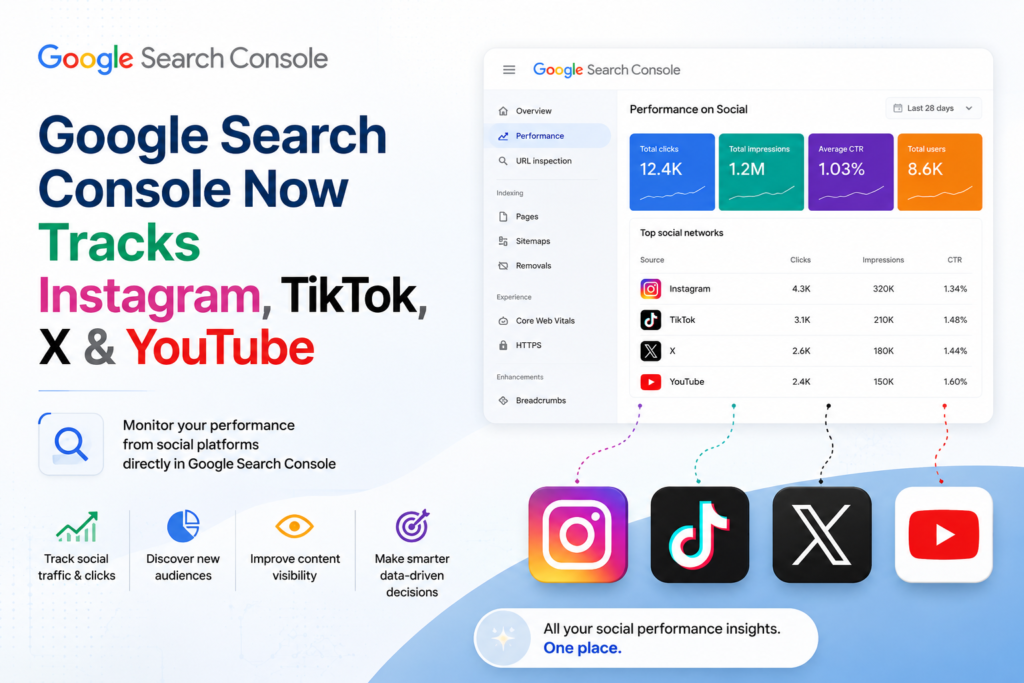
That changed on July 7, 2026. Google rolled out a new property type called platform properties, and it lets you connect an Instagram, TikTok, X, or YouTube account straight into Search Console — no website required. It might sound like a minor feature update. It isn’t. Google just admitted, in product form, that a huge chunk of what people search for these days doesn’t live on a website at all.
Let’s break down what changed, how it works, and whether it’s actually worth your time.
The Gap Is Finally Closing
Here’s what’s been bugging creators for years: your TikTok video can rank in Google Search. Your Instagram post can show up in Google Discover. Your YouTube video can land as the top result for a search query. And until recently, you had no way of knowing any of that — unless you happened to notice a weird spike in views and went digging for an explanation.
TikTok’s native analytics will tell you how a video performed inside TikTok: views, likes, shares, average watch time. What it won’t tell you is that 40% of those views came from someone typing a question into Google and clicking through. That’s a real blind spot, because Search and Discover traffic behaves nothing like in-app discovery. People arriving from Search already have a rough idea of what they’re looking for. That’s a completely different audience than someone doomscrolling their For You page.
Search Console has solved this problem for websites for years. Platform properties now do the same job for social accounts.
What Google Actually Launched
Moshe Samet, the product lead on Search Console, announced platform properties in a post on the Google Search Central blog. The idea, in short: creators can now see which search terms send people to their Instagram, TikTok, X, and YouTube content, and get a clearer picture of how their audience finds and interacts with their posts.
Four platforms launched at once:
- TikTok
- X (formerly Twitter)
- YouTube
Each platform gets its own property inside Search Console, completely separate from any website property you already manage. Once you verify the account, Google starts populating three reports.
The Performance report — This one will feel familiar if you’ve ever used Search Console for a website. You get total clicks, impressions, and the ability to filter and sort by individual post and by search query. If a caption or video title is quietly driving a surprising amount of search traffic, this is where you’d spot it. You can export the raw data too, if you’d rather dig through it yourself.
The Insights report — A higher-level view of recent traffic trends, your best-performing posts, and how people are actually discovering your account through Google. Think of it as the version you check once a week over coffee, not the one you obsess over all day.
Achievements — A small, fun addition. It tracks milestones, like crossing a new threshold of clicks from Search over a rolling 28-day period. Gamified, sure, but a decent way to see momentum building without staring at a graph.
None of this requires a website. A creator who’s only ever posted on YouTube — never built a site, never touched a domain registrar — can now open Search Console and see real Google Search data about their content for the first time. That’s the part that actually matters.
Setting One Up
The setup process is close to what you’d expect if you’ve ever verified a website property before, just adapted for an app account instead of a domain.
- Open Search Console and head to the property selector in the sidebar.
- Click “Add property.”
- Pick your platform: Instagram, TikTok, X, or YouTube.
- Follow the on-screen verification steps to authorize the connection. This confirms you actually own the account, the same way domain verification confirms you own a website.
- Wait a few days. Google says data typically starts showing up shortly after verification, and the rollout itself is gradual — so don’t panic if the option isn’t in your account yet. It’s expanding over the coming weeks.
One thing worth flagging before you get too excited: there’s no historical data. You won’t see how your account performed in Search before you connected it. Tracking starts the moment you verify, so the earlier you set this up, the more useful your data becomes down the line.
How This Differs From Google’s Earlier Attempt
This isn’t Google’s first swing at connecting social content to Search Console. Back in December 2025, an experimental feature folded some social channel data into the Insights report — but only for websites you already owned. It was limited. You needed a verified site, Google would detect a linked social profile and offer to add it, and there was no way to manually connect an account on its own.
Platform properties scrap that model entirely. You verify the social account directly. It doesn’t need to be tied to a website at all, and it’s its own standalone property in Search Console, not a bolt-on to something you already manage.
It’s also worth separating this from Search profiles, which Google introduced back in June 2026. Those are public-facing pages that showcase a creator’s content to their followers — a discovery surface your audience actually sees. Platform properties are the opposite: private, analytics-only, visible solely to the account owner. One is about being found. The other is about understanding how you’re already being found. Easy to mix up, since they launched a month apart, but they solve completely different problems.
Why This Actually Matters for How You Create Content
When a platform ships a new analytics feature, my gut reaction is usually “cool, another dashboard.” This one feels different.
Search intent and social intent aren’t the same thing. When someone’s scrolling Instagram, they’re mostly reacting to a hook, a thumbnail, or the first three seconds. When someone’s searching Google, they’re typing something specific because they want an actual answer. If your Reel or YouTube video is showing up for a chunk of search queries, that tells you something concrete: your caption, your title, your on-screen text is answering a question people are genuinely asking. That’s a signal worth chasing.
Right now, most creators write captions and titles purely for the feed algorithm — punchy, attention-grabbing, built for the scroll. Platform properties give you a reason to also think about search intent: the kind of phrasing someone would type into a search bar, not just the kind that stops a thumb mid-scroll. Those two goals don’t always overlap, but when they do, you get a post that works twice as hard.
There’s a brand-side angle here too. For years, social teams and SEO teams have basically worked in separate buildings. Social tracks engagement, reach, and follower growth. SEO tracks organic clicks, rankings, and impressions. Neither side had real visibility into how the other’s work showed up in Google Search, because that data simply didn’t exist in an accessible form. Platform properties start closing that gap. A brand can now watch Instagram, TikTok, X, and YouTube performance in the same interface where its website data already lives, instead of stitching together exports from four different tools and hoping the numbers line up.
What It Won’t Tell You
Worth being upfront about the limits, because I’ve seen a few posts oversell this feature.
Platform properties only show data from Google Search, News, and Discover. That’s it. There’s no visibility into in-app engagement — no likes, no shares, no watch-through rate. If you want that, you’re still opening the native app’s own analytics. Think of platform properties as one extra lens, not a replacement for the tools you already rely on.
And again: no historical backfill. Whatever happened before you verified the account is gone, at least as far as this tool is concerned.
Should You Set This Up Now?
Yes — mostly because there’s no real downside. It takes a few minutes, costs nothing, and the sooner you connect an account, the sooner you start building a dataset you can actually learn from. If you’re a creator who posts consistently on any of these four platforms, even without a website, this is free, first-party data about how Google is treating your content.
If you’re managing a brand’s presence across social and search, treat this as an early-mover opportunity. The feature just launched, most competitors haven’t figured out what to do with it yet, and there’s a real window to build search-aware content habits before this becomes standard practice.
The Bigger Picture
Google’s been steadily expanding what Search Console covers. AI Overview performance reports landed in June, Search profiles arrived the same month, and now platform properties in July. Line those up, and a clear pattern emerges: Google is quietly admitting that “the web” people search doesn’t mean “websites” anymore. It means videos, posts, profiles — whatever format someone chose to publish in.
For creators and brands who’ve long treated social platforms and search engines as two unrelated worlds, this is the first real bridge between them. Whether people actually use it well is a different question, but the data’s there now, sitting in Search Console, waiting for someone to open it.
If you post on Instagram, TikTok, X, or YouTube, go connect a platform property today. Even if nothing jumps out in the numbers yet, you’ll be glad you started the clock early.
Frequently Asked Questions
Do I need to own a website to use this?
No. That’s the entire point of the feature. You verify the social account itself, not a domain.
Will more platforms get added later?
Google hasn’t ruled it out, and it feels like a when, not an if. LinkedIn and Pinterest come up a lot in the discussion around this launch, though nothing’s been confirmed.
Does this replace my platform’s native analytics?
No, and it’s not trying to. Native analytics tell you what happened inside the app. Platform properties tell you what happened on the way in, from Google Search. You need both.
Can I connect more than one platform at a time?
Yes. Each platform gets verified separately, and there’s no rule limiting you to one. Connect Instagram, TikTok, X, and YouTube all at once if you’re active on all four.
Is there a cost to any of this?
No. Search Console has always been free, and platform properties are part of the same tool.
What happens if I stop posting on a connected account?
The property simply stops collecting new data, the same way a website property does if the site goes dark. Nothing gets deleted, and you can always reconnect later.
How long until I see data after verifying?
Google says a few days for the first numbers to show up, though the feature itself is still rolling out gradually, so some accounts may see the option appear later than others.